# 5 Best Tools to Find and Remove Duplicate Files in Linux
[Marin Todorov](https://www.tecmint.com/author/marintodorov89/ "View all posts by Marin Todorov")Categories[Linux Commands](https://www.tecmint.com/category/linux-commands/)[34 Comments](https://www.tecmint.com/find-and-delete-duplicate-files-in-linux/#comments)
Organizing your home directory or even system can be particularly hard if you have the habit of downloading all kinds of stuff from the internet using your [download managers](https://www.tecmint.com/download-managers-for-linux/ "Download Managers for Linux").
Often you may find you have downloaded the same mp3, pdf, and epub (and all kinds of [other file extensions](https://www.tecmint.com/find-file-types-in-linux/ "Find File Types in Linux")) and [copied it to different directories](https://www.tecmint.com/cp-command-examples/ "Copy Files in Linux"). This may cause your directories to become cluttered with all kinds of useless duplicated stuff.
In this tutorial, you are going to learn how to find and delete duplicate files in Linux using **rdfind**, **fdupes,** and **rmlint** command-line tools, as well as using GUI tools called **DupeGuru** and [FSlint](https://www.tecmint.com/fslint-find-and-remove-duplicate-unwanted-files-in-linux/).
A note of caution – always be careful what you delete on your system as this may lead to unwanted data loss. If you are using a new tool, first try it in a [test directory where deleting files](https://www.tecmint.com/remove-directory-linux/ "Delete Directory in Linux") will not be a problem.
## 1. Rdfind – Find Duplicate Files in Linux
**[Rdfind](https://github.com/pauldreik/rdfind "Rdfind - Find Duplicate Files")** comes from redundant data find, which is a free command-line tool used to find duplicate files across or within multiple directories. It recursively scans directories and identifies files that have identical content, allowing you to take appropriate actions such as deleting or moving the duplicates.
**Rdfind** uses an algorithm to classify the files and detects which of the duplicates is the original file and considers the rest as duplicates.
The rules of ranking are:
- If **A** was found while scanning an input argument earlier than **B**, **A** is higher ranked.
- If **A** was found at a depth lower than **B**, **A** is higher ranked.
- If **A** was found earlier than **B**, **A** is higher ranked.
The last rule is used particularly when two files are found in the same directory.
### Install Rdfind on Linux
To install **rdfind** in Linux, use the following command as per your Linux distribution.
```
$ sudo apt install rdfind [On Debian, Ubuntu and Mint]
$ sudo yum install rdfind [On RHEL/CentOS/Fedora and Rocky/AlmaLinux]
$ sudo emerge -a sys-apps/rdfind [On Gentoo Linux]
$ sudo apk add rdfind [On Alpine Linux]
$ sudo pacman -S rdfind [On Arch Linux]
$ sudo zypper install rdfind [On OpenSUSE]
```
To run **rdfind** on a directory simply type **rdfind** and the target directory.
```
$ rdfind /home/user
```
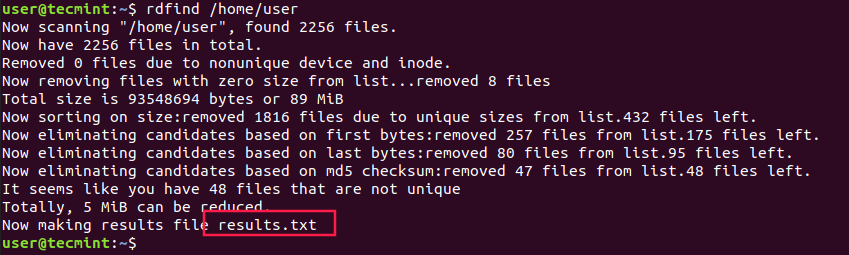Find Duplicate Files in Linux
As you can see **rdfind** will save the results in a file called **results.txt** located in the same directory from where you ran the program. The file contains all the duplicate files that rdfind has found. You can review the file and remove the duplicate files manually if you want to.
Another thing you can do is to use the `-dryrun` an option that will provide a list of duplicates without taking any actions:
```
$ rdfind -dryrun true /home/user
```
When you find the duplicates, you can choose to replace them with hard links.
```
$ rdfind -makehardlinks true /home/user
```
And if you wish to delete the duplicates you can run.
```
$ rdfind -deleteduplicates true /home/user
```
To check other useful options of **rdfind** you can use the **rdfind** manual.
```
$ man rdfind
```
## 2. Fdupes – Scan for Duplicate Files in Linux
[Fdupes](https://www.tecmint.com/fdupes-find-and-delete-duplicate-files-in-linux/) is another command-line program that allows you to identify duplicate files on your system. It searches directories recursively, comparing file sizes and content to identify duplicates.
It uses the following methods to determine duplicate files:
- Search recursively
- Exclude empty files
- Shows the size of duplicate files
- Delete duplicates immediately
- Exclude files with a different owner
### Install Fdupes in Linux
To install **fdupes** in Linux, use the following command as per your Linux distribution.
```
$ sudo apt install fdupes [On Debian, Ubuntu and Mint]
$ sudo yum install fdupes [On RHEL/CentOS/Fedora and Rocky/AlmaLinux]
$ sudo emerge -a sys-apps/fdupes [On Gentoo Linux]
$ sudo apk add fdupes [On Alpine Linux]
$ sudo pacman -S fdupes [On Arch Linux]
$ sudo zypper install fdupes [On OpenSUSE]
```
**Fdupes** syntax is similar to **rdfind**. Simply type the command followed by the directory you wish to scan.
```
$ fdupes
```
To search files recursively, you will have to specify the `-r` an option like this.
```
$ fdupes -r
```
You can also specify multiple directories and specify a **dir** to be searched recursively.
```
$ fdupes -r
```
To have fdupes calculate the size of the duplicate files use the `-S` option.
```
$ fdupes -S
```
To gather summarized information about the found files use the `-m` option.
```
$ fdupes -m
```
Scan Duplicate Files in Linux
Finally, if you want to delete all duplicates use the `-d` an option like this.
```
$ fdupes -d
```
**Fdupes** will ask which of the found files to delete. You will need to enter the file number:
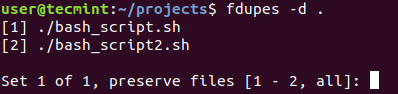Delete Duplicate Files in Linux
A solution that is definitely not recommended is to use the `-N` option which will result in preserving the first file only.
```
$ fdupes -dN
```
To get a list of available options to use with **fdupes** review the help page by running.
```
$ fdupes -help
```
## 3. Rmlint – Remove Duplicate Files
[Rmlint](https://github.com/sahib/rmlint "Rmlint - Remove Duplicate Files") is a command-line tool that is used for finding and removing duplicate and lint-like files in Linux systems. It helps identify files with identical content, as well as various forms of redundancy or lint, such as empty files, broken symbolic links, and orphaned files.
### Install Rmlint on Linux
To install **Rmlint** in Linux, use the following command as per your Linux distribution.
```
$ sudo apt install rmlint [On Debian, Ubuntu and Mint]
$ sudo yum install rmlint [On RHEL/CentOS/Fedora and Rocky/AlmaLinux]
$ sudo emerge -a sys-apps/rmlint [On Gentoo Linux]
$ sudo apk add rmlint [On Alpine Linux]
$ sudo pacman -S rmlint [On Arch Linux]
$ sudo zypper install rmlint [On OpenSUSE]
```
## 4. dupeGuru – Find Duplicate Files in a Linux
**[dupeGuru](https://dupeguru.voltaicideas.net/ "dupeGuru - Find Duplicate Files")** is an open-source and cross-platform tool that can be used to find duplicate files in a Linux system. The tool can either scan filenames or content in one or more folders. It also allows you to find the filename that is similar to the files you are searching for.
**dupeGuru** comes in different versions for Windows, Mac, and Linux platforms. Its quick fuzzy matching algorithm feature helps you to find duplicate files within a minute. It is customizable, you can pull the exact duplicate files you want to, and Wipeout unwanted files from the system.
### Install dupeGuru on Linux
To install **dupeGuru** in Linux, use the following command as per your Linux distribution.
```
$ sudo apt install dupeguru [On Debian, Ubuntu and Mint]
$ sudo yum install dupeguru [On RHEL/CentOS/Fedora and Rocky/AlmaLinux]
$ sudo emerge -a sys-apps/dupeguru [On Gentoo Linux]
$ sudo apk add dupeguru [On Alpine Linux]
$ sudo pacman -S dupeguru [On Arch Linux]
$ sudo zypper install dupeguru [On OpenSUSE]
```
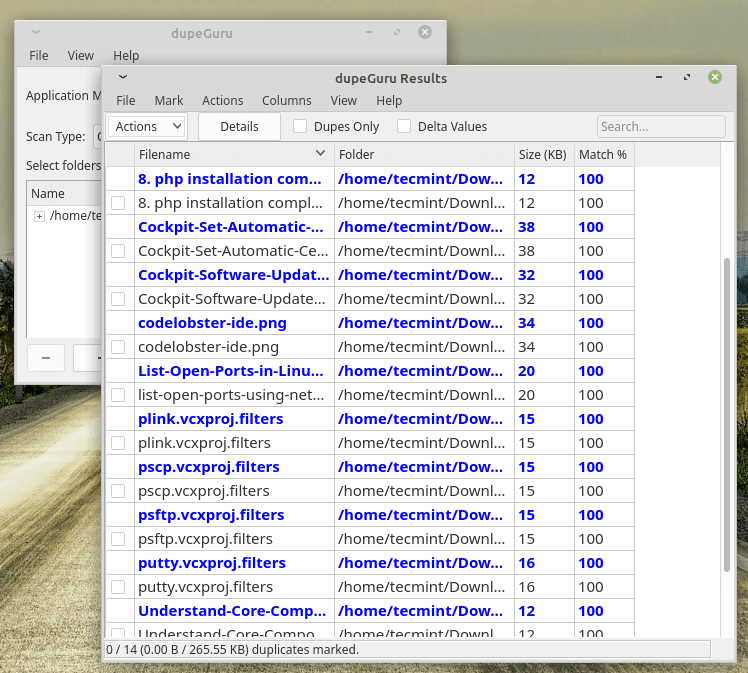DupeGuru – Find Duplicate Files in Linux
## 5. FSlint – Duplicate File Finder for Linux
**[FSlint](https://www.tecmint.com/fslint-find-and-remove-duplicate-unwanted-files-in-linux/)** is a free utility that is used to find and clean various forms of lint on a filesystem. It also reports duplicate files, empty directories, temporary files, duplicate/conflicting (binary) names, bad symbolic links, and many more. It has both command-line and GUI modes.
However, it’s important to note that as of my knowledge cutoff in September 2022, **FSlint** was last updated in 2013 and may not be actively maintained or compatible with newer Linux distributions.
### Install FSlint on Linux
To install **FSlint** in Linux, use the following command as per your Linux distribution.
```
$ sudo apt install fslint [On Debian, Ubuntu and Mint]
$ sudo yum install fslint [On RHEL/CentOS/Fedora and Rocky/AlmaLinux]
$ sudo emerge -a sys-apps/fslint [On Gentoo Linux]
$ sudo apk add fslint [On Alpine Linux]
$ sudo pacman -S fslint [On Arch Linux]
$ sudo zypper install fslint [On OpenSUSE]
```
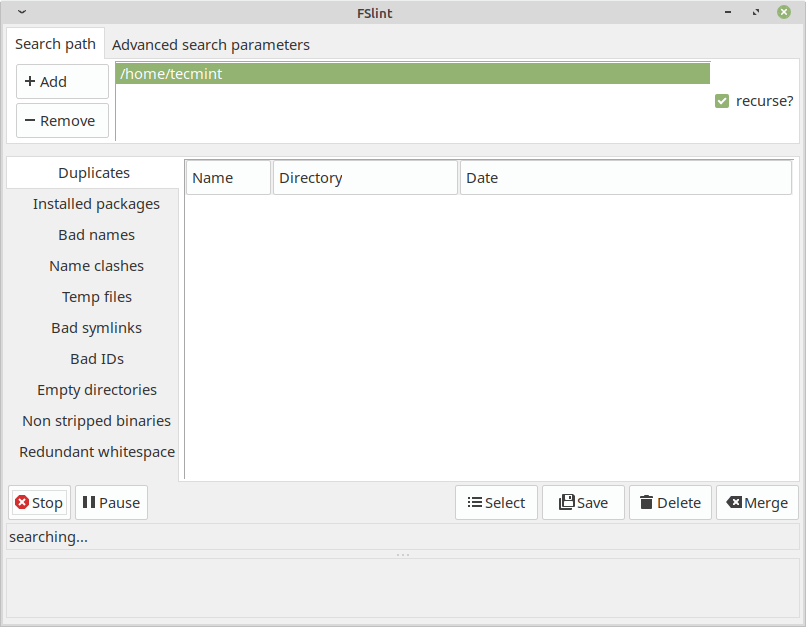FSlint – Duplicate File Finder for -Linux
##### Conclusion
These are very useful tools to find duplicated files on your Linux system, but you should be very careful when deleting such files.
If you are unsure if you need a file or not, it would be better to create a backup of that file and remember its directory prior to deleting it. If you have any questions or comments, please submit them in the comment section below.